Industrial dispensing
Link staff permissions and work orders to controlled issue, inventory records and returns inspection.
Authorize → dispense → confirm quantity → record
SMART CABINET · PCBA + FIRMWARE + SOFTWARE
A shared electronics and software architecture for industrial dispensing, parcel lockers and unattended retail. Bring access control, door feedback and business records into one cabinet system.
01
Link staff permissions and work orders to controlled issue, inventory records and returns inspection.
Authorize → dispense → confirm quantity → record
Coordinate deposit, one-time pickup credentials and collection records across individual compartments.
Deposit → assign credential → collect → close
Design the access, item-identification and settlement workflow around the merchandise and cabinet format.
Authorize → select items → identify → reconcile
APPLICATION WORKFLOWS
A shared state machine tracks opening and closing. Each application adds its own identity, item, handover and exception rules. A lock ACK confirms command acceptance; completing a transaction also requires the physical door cycle and item evidence.
For MRO tools, consumables, spare parts and production work orders. Associate employee permissions with work orders and record SKU and quantity. Returned items enter quarantine before quality review restores available stock.
Employee / work order → SKU / compartment → door feedback → quantity confirmation → inventory & audit; return → quarantine → inspection.
Integration inputs: ERP/WMS APIs, employee and work-order sources, compartment stocking rules, return inspection and counting method.
For offices, campuses, apartments and collection points. Link deposits to a waybill and recipient. Issue a one-time pickup credential after closure and occupancy confirmation; release the compartment after removal and secure closure.
Vacant compartment → deposit → closure / occupancy → pickup credential → identity check → removal / closure → release.
Integration inputs: waybill APIs, notification channels, credential validity, occupancy detection and overdue or disputed pickups.
For drinks, snacks and fresh food. Separate access authorization, item identification and reconciliation. Weighing, RFID or vision records item changes; uncertain recognition and amount mismatches require review. Add temperature, expiry and replenishment rules for fresh food.
Access / payment authorization → selection → item-change recognition → secure closure → reconciliation → settlement or review.
Integration inputs: products and packaging, recognition method, payment provider, temperature control, replenishment and refund disputes.
Already have a cabinet, locks or business system? Send model numbers and interface documents to define the board changes and integration scope.
Discuss application & interfaces02
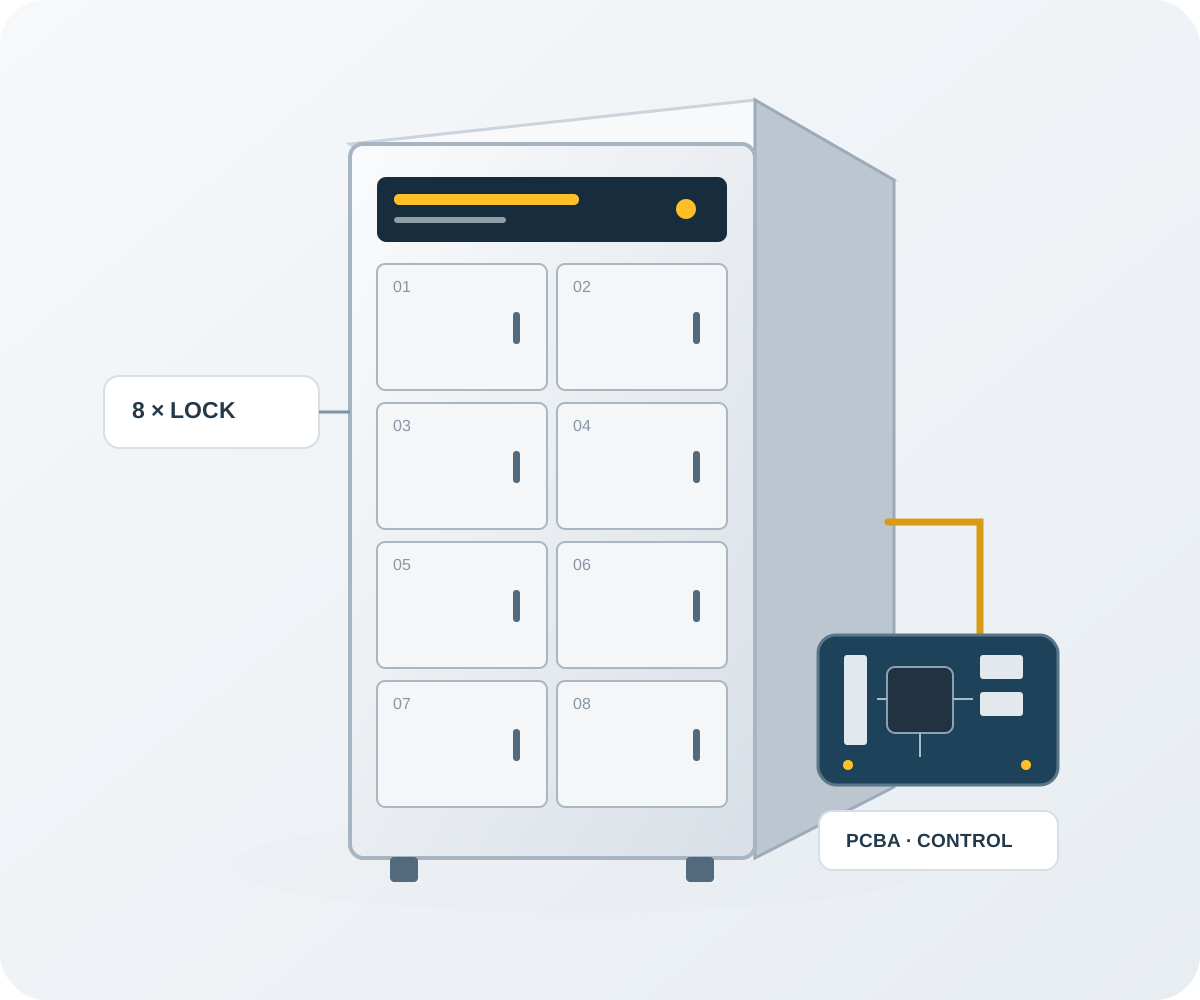
The control architecture uses eight lock channels and an external 24 V supply for indoor compartment cabinets. It separates lock actuation from the application workflow.
Sequential opening operates one lock at a time. Pulse timing coordinates the door-release sequence.
Separate contact inputs distinguish an open door from an unlatched lock and support exception handling.
Command identifiers, expiry checks and fault isolation help manage repeated or interrupted requests.
Keep the user, compartment, issue or collection operation and confirmation in a linked business record.
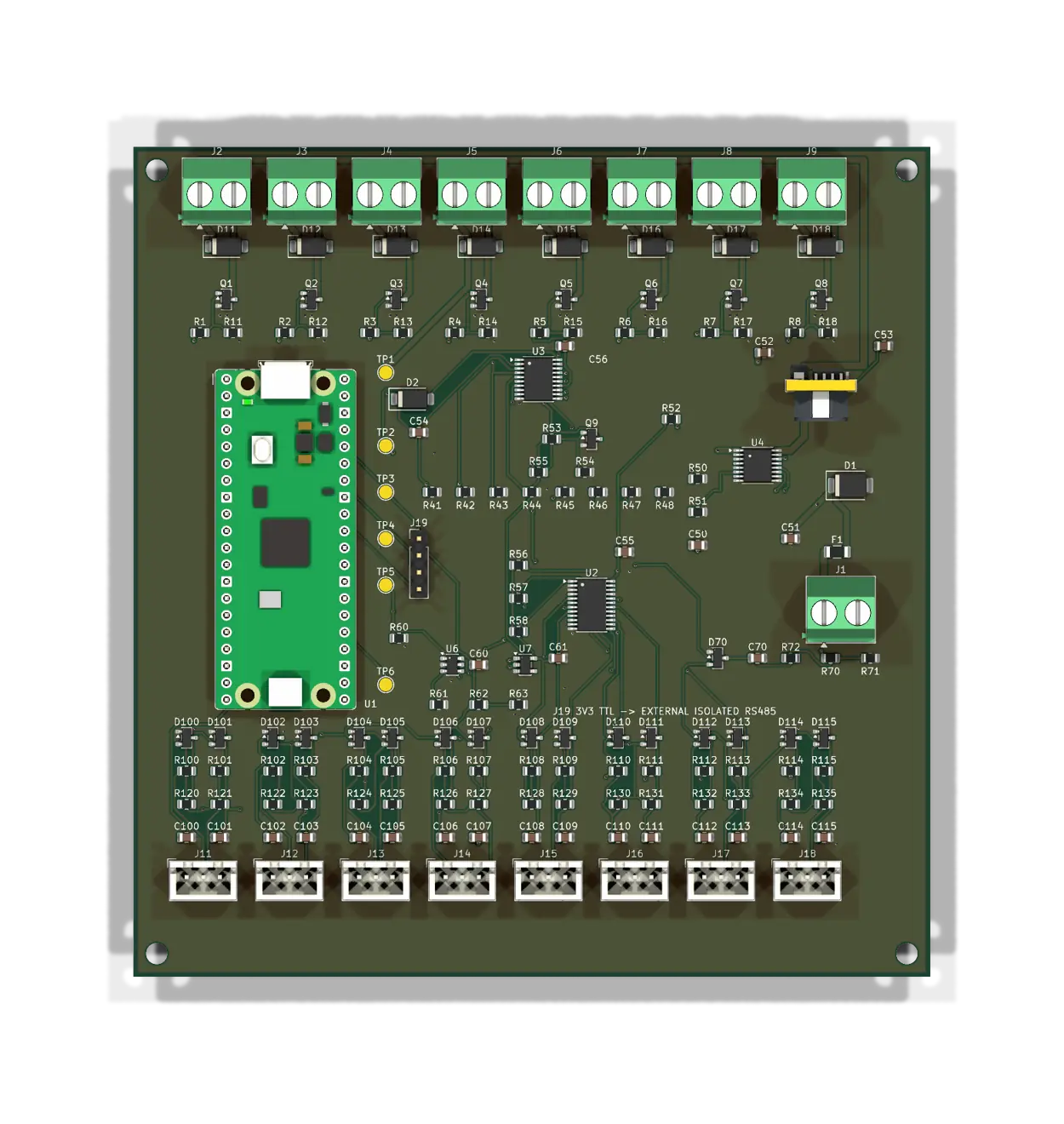
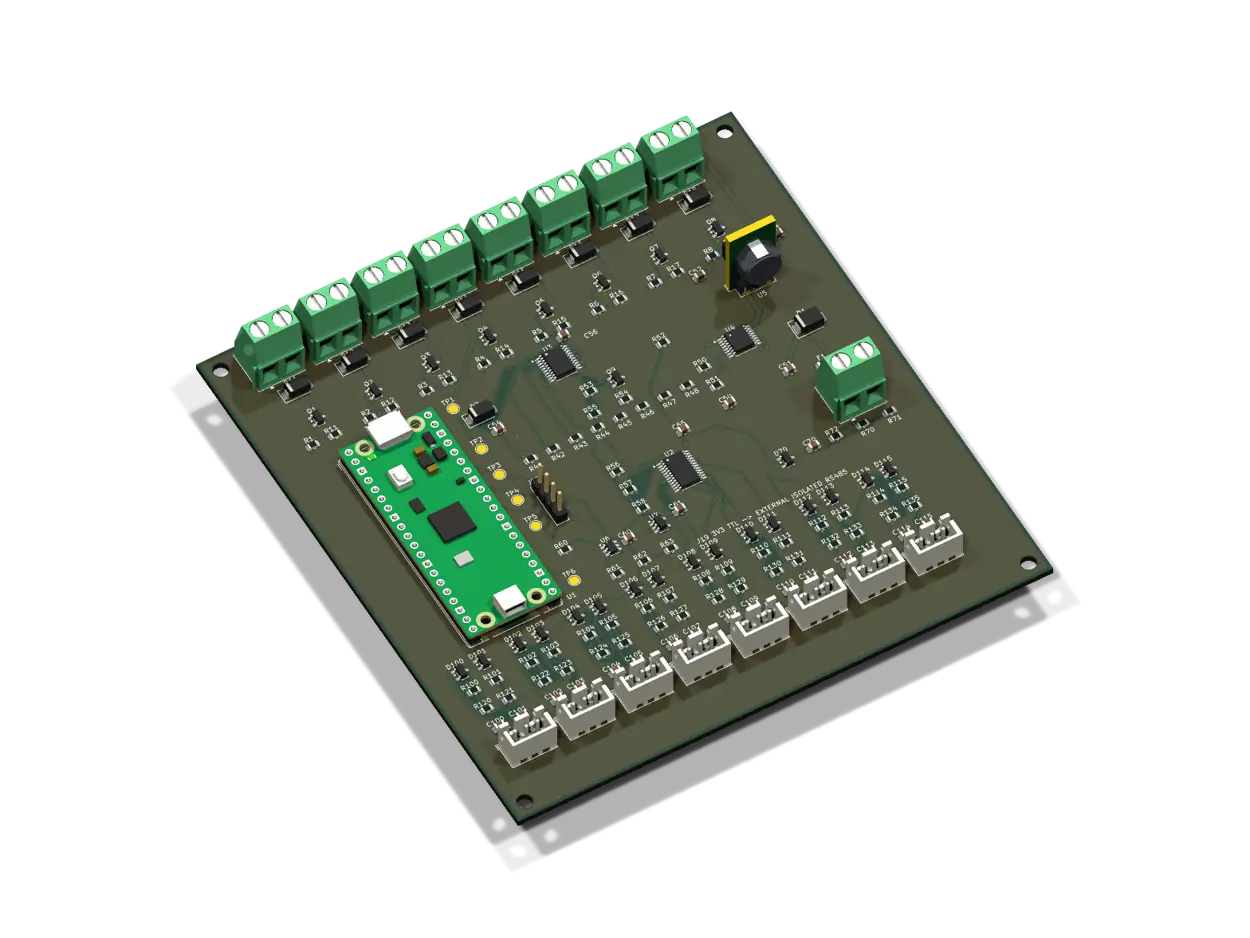
PCBA & INTERFACES
The controller handles timed lock actuation and door feedback. The host handles access rights, item handover and business records. Explicit commands and confirmation rules connect the two layers for different cabinets and workflows.
| Item | Configuration | Design & selection notes |
|---|---|---|
| Power | External 24 V DC | Lock power is monitored separately from logic power; USB does not supply the locks. |
| Lock outputs | 8 two-wire pulse locks | Drive one lock at a time; match coil current, pulse duration and cable voltage drop. |
| Feedback | 8 door-closed + 8 latch contacts | Separate dry contacts close to GND to distinguish door closure from latch engagement. |
| PCB & mounting | 120 × 125 mm · 2 layers | Four mounting holes; mounting-plate DXF, connector definitions and harness tables included. |
| Controller | Raspberry Pi Pico / RP2040 | Door state machine on the MCU; an I²C expander reads door and latch inputs. |
| Local link | USB CDC / UART0 · 115200 | J19 uses 3.3 V TTL; an external transceiver or isolation module provides RS485. |
| Timing | 100–1000 ms software pulse | Independent hardware enable window; rearm and secure-door conditions gate the next output. |
| Input handling | 30 ms contact debounce | Check valid inputs, power, heartbeat and the active door cycle together. |
Fuse, TVS and eFuse protect the input path. A 24-to-5 V converter powers the controller and an ADC monitors protected lock power. Low-side MOSFETs and flyback diodes drive the coils; budget for locks, peripherals and startup transients.
Driver enable works with a separate hardware window. Firmware validates each host command before pulsing. Sequential operation avoids concurrent openings; match pulse time to the lock and record failure to open, timeout and held-open events.
J2–J9 connect eight locks; J11–J18 connect door and latch contacts. Define door numbering, polarity and cable labels consistently. Quantity and occupancy come from operator confirmation, weighing, RFID or vision rather than the door contacts.
03
Select these integration options around your cabinet, sensors and business systems.
Choose an item-identification method for quantity confirmation and inventory reconciliation.
Integrate temperature sensors, expiry rules and alarm workflows for fresh-food applications.
Connect ERP, WMS or access systems; define payment-provider integration for retail workflows.
Use transaction and fault data to plan replenishment, identify abnormal usage and prioritize maintenance.
FIRMWARE & SOFTWARE
The local serial link uses newline-delimited JSON (NDJSON). Boot identity, command expiry and duplicate handling remain consistent. The host maps door feedback to business states before updating inventory, handover or review records.
Read session_id and uptime_ms at startup and timestamp open requests using device uptime. Requests include request_id, door_id, pulse_ms and ttl_ms. Maintain a one-second heartbeat and state refresh; reconcile unfinished workflows after a reboot.
A cycle follows idle → pulsing → wait_open → wait_close → idle; fault invokes exception handling. Closed doors, engaged latches, valid inputs, power and driver readiness jointly gate the next command. Old or repeated frames cannot extend freshness.
The local Node.js / SQLite workbench commits workflow, stock, audit and replay receipts in transactions. Writes require an identity token and Idempotency-Key. Business retries can replay results; short-lived firmware deduplication does not replace persistent business idempotency.
| Application | Example endpoints | Confirmation rule |
|---|---|---|
| Industrial | /industrial/issues · /industrial/issue-confirm | Confirm issue after the door cycle and locking; verify SKU, count and inspection record on return. |
| Parcel | /parcel/deposits · /parcel/pickups | Issue credentials after confirmed deposit occupancy; finish handover after removal and closure. |
| Retail | /retail/item-events · /retail/settlement-preview | Reconcile item changes with authorization; route uncertain recognition or disputes to review. |
Download the complete field definitions, error codes, bit masks, timing and flashing instructions. This serial protocol is for a trusted local link; remote projects need TLS, device authentication, access controls and log reconciliation at the gateway.
04
ENGINEERING DOWNLOADS
Download directly, without a form. The complete package includes PCBA and fabrication files, two firmware targets, business software, serial gateway, mounting drawing and implementation documents, with module-specific setup and integration instructions.
V0.2 · ZIP · 129 files · 3.22 MiB
TXT · 4.4 KiB
DownloadCSV · 28.4 KiB
DownloadCSV · 6.3 KiB
DownloadCSV · 4.1 KiB
DownloadCSV · 3.4 KiB
DownloadTXT · 1.1 KiB
DownloadFile inventory & SHA-256 checksums
Share the application, door count, lock specifications, cabinet drawings and software interfaces. We will define the hardware, firmware, software, harness and test scope, with the inputs needed for prototype and volume quotations.
Request customization & quotationINTEGRATION Q&A
Plan additional controller boards or bus nodes with power capacity, addressing, harnesses, termination and fault isolation. Define RS485, Ethernet or wireless links through the appropriate gateway or communication module.
Door and latch contacts confirm access. Quantity identification needs weighing, RFID, vision or operator counting. Choose according to weight differences, packaging, placement and accuracy requirements.
Integrate cooling/temperature control, probes, held-open alarms, expiry rules and replenishment beyond door control. Provide operating temperatures, food types and cabinet thermal-design inputs.
Read the package README, then the connector tables, firmware PROTOCOL and software README. Use the requirements template for inquiries, with cabinet drawings, lock lists and business API documentation.
Share the application, door count, lock specifications, cabinet drawings and software interfaces. We will define the hardware, firmware, software, harness and test scope, with the inputs needed for prototype and volume quotations.