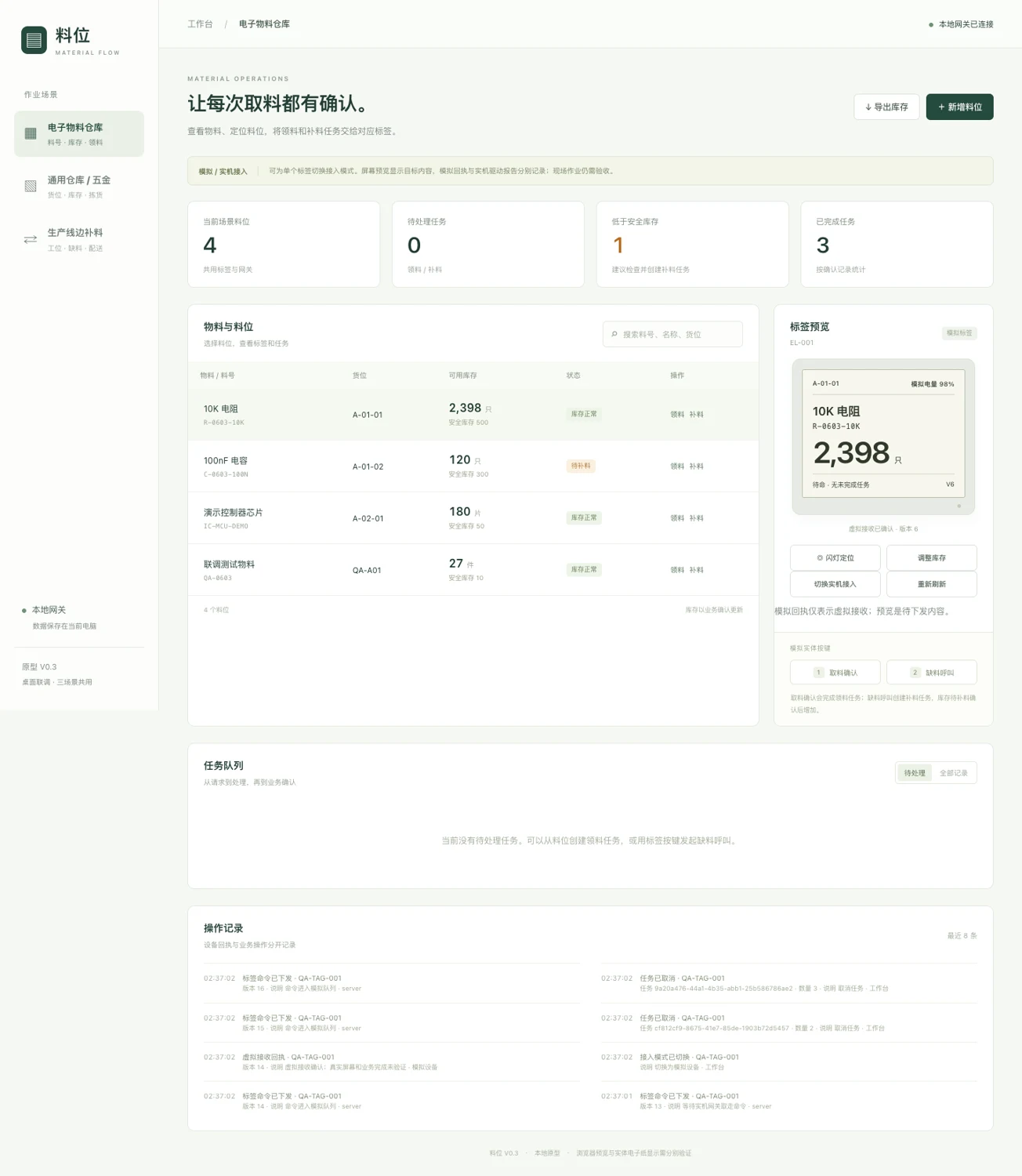
A shared electronic-paper label, local workbench and device gateway for electronics stores, general warehouse bins and production lineside replenishment. Connect the displayed task to a recorded material movement.
Software and target builds verified. Physical prototype and site acceptance pending.
Local demonstration workbench. Label previews and device messages are simulated; this is not a photograph of a working tag.
PCBA Partner · Engineering reference · Updated 4 October 2026
01
Three locations. One material workflow.
01
Electronics material warehouse
Match component code, bin and pick quantity to a work-order reference. Reserve stock when a pick is created; deduct it only after business confirmation.
Example: issue 30 resistors from A-01 against a production order. Lot, date-code, MSL and FIFO rules need a separate integration.
Show part code, storage location, available task and unit. Flash the location indicator to help find the bin, then check the part and location in the workbench.
Example: pick 12 fasteners from B-03. Weighing, RFID and automatic quantity sensing are future integration options.
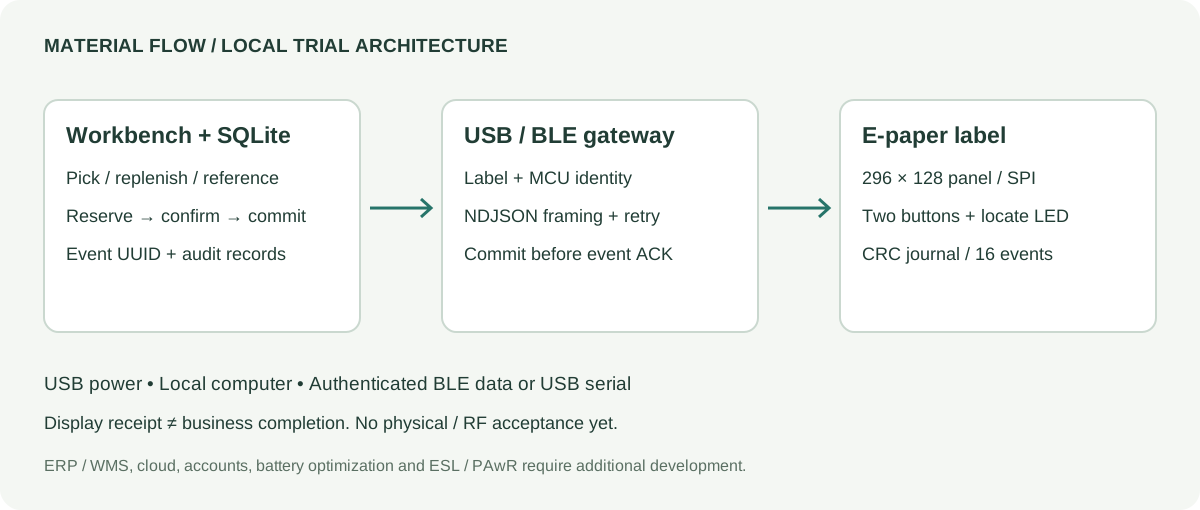
The current trial runs on one controlled computer. USB supplies power; USB serial or authenticated BLE carries data. The built-in demonstration mode can be used before the hardware arrives.
V0.3 · local trial architecture
Workbench + SQLite
Create locations, reserve picks, manage replenishment and record confirmations. Integer quantities, transaction checks and request UUIDs prevent a repeated request from becoming a second stock movement.
USB / BLE gateway
Bind each label to its MCU device ID. Parse newline-delimited JSON across arbitrary BLE fragments; commit events to the backend before acknowledging them. A transport response does not complete a task.
Label firmware
Drive the 296 × 128 black-and-white panel, two buttons and locate LED. Keep up to 16 unacknowledged events in a CRC-protected two-slot journal. Reboot requests a fresh display sync.
Business-system extension
Map work orders, locations, units, lots and reconciliation rules before adding ERP/WMS. These connectors, multiuser permissions and a cloud backend are not included in V0.3.
03
Separate receipt, display and stock confirmation.
01
Create & reserve
A pick reserves quantity. Other open picks remain in the queue; only the selected task is shown on a label.
02
Send & report
An immutable command carries its UUID and display version. Firmware reports driver completion after observing BUSY; this is not optical screen verification.
03
Confirm the action
The workbench requires part code, location and operator ID. Wrong codes are rejected. Button 1 confirms the particular task previously reported as displayed.
04
Commit & retry safely
The backend persists each event UUID. A lost ACK can be retried without a second stock deduction. Display receipts alone never alter inventory.
The compatibility API also accepts a legacy empty completion body. Physical-button confirmation does not provide scan evidence, and the entered operator ID is not an authenticated account. A mandatory-scan or role-based process needs additional policy controls.
04
A module-first prototype you can inspect.
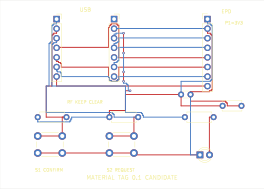
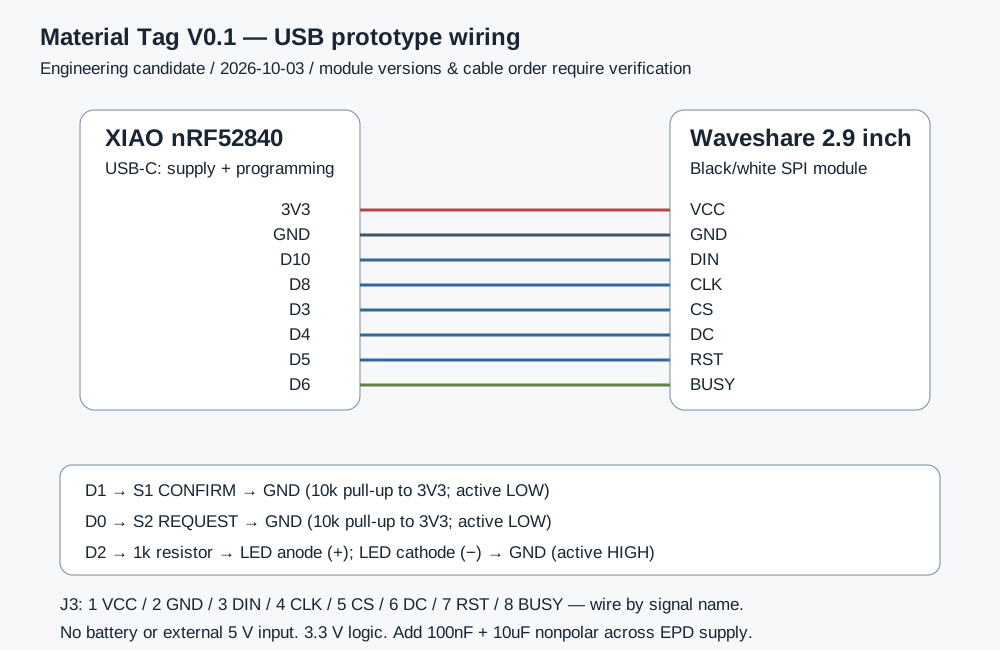
The target is the non-Plus, non-Sense Seeed XIAO nRF52840 with a Waveshare 2.9-inch black-and-white V2 finished module. The carrier is a passive 70 × 50 mm, two-layer interface-board candidate.
KiCad PCB · 70 × 50 mm · engineering candidate
Display / driver
296 × 128; GxEPD2_290_T94_V2; Chinese and Latin text
Power
USB into XIAO; 3.3 V peripheral logic. No battery-life result.
SPI wiring
MOSI D10; SCK D8; CS D3; DC D4; RST D5; BUSY D6
Operator controls
D1 confirm; D0 shortage; D2 locate LED through 1 kΩ
EL-001, WH-001 and LS-001: HEX + Nordic DFU ZIP; no UF2
Start with wired modules, then lock the BOM and check connector, USB and antenna clearances before ordering the carrier. CAM is supplied for engineering review; capacitor MPNs, mechanical fit and manufacturing release remain open.
A USB command opens a 60-second pairing window. The SDK supplies a dynamic PIN, printed only over USB. Firmware requires authenticated encrypted mode and a 16-byte key; the gateway also checks label and device identity.
Bounded messages and durable events
20-byte BLE writes feed a bounded NDJSON parser. CRC and two journal slots detect damaged records; storage faults stop normal processing. Reconnection resends pending event UUIDs.
Consistent backup and restore
The management tool checks database integrity and creates a consistent SQLite backup. Restore writes to a new path. Reconcile post-backup movements and restart tags for fresh display versions.
This is an ordinary BLE NUS GATT implementation, not the Bluetooth ESL / PAwR standard. Pairing, bonding, RF coverage, flash endurance and fault behavior still require physical tests.
06
Review what the evidence establishes.
Completed in the engineering environment
Backend / interface
43 backend checks; 36 browser checks.
Gateway / core
11 USB gateway + 11 BLE gateway host checks; 111 C core assertions.
Storage / target
10,704 journal corruption and truncation cases; three ARM firmware targets compile.
Carrier checks
ERC 0, DRC 0, unconnected 0 and schematic parity 0. Ignored defaults are disclosed in the reports.
Requires physical prototypes
No boards have been flashed or assembled for this trial. Check the screen, GPIO, PIN/bond behavior, three-device radio concurrency, power loss, current, heat, ESD, mounting and a week of real operations. Software and CAD checks do not establish those results.
V0.3 · ENGINEERING TRIAL CANDIDATE
07
Start with three working tags and one spare set.
01
Prepare the exact modules
Four XIAO boards, four V2 panels, ten buttons, five LEDs and USB/wiring accessories. Match the supplied display revision and signal names.
02
Prove a single desk prototype
Check supply, USB identity, full-text display, buttons, locate indicator, duplicates and restart behavior before BLE commissioning.
03
Run the three-scene pilot
Bind one label per workflow, execute the acceptance sheet and reconcile actual stock. Collect coverage, refresh latency and failure data before setting deployment limits.
08
Engineering files, free to download.
The complete public package includes software and firmware source, pinned dependency archives, binaries, native KiCad files, CAM candidates, drawings, procurement documents and test reports. Local machine paths are removed; runtime databases, environments and credentials are excluded.
Page text is available in five languages. The new implementation guide and procurement checklist are in English; original detailed development documents are mainly Chinese. Upstream licenses are retained, including GxEPD2 GPLv3 and font notices. Do not treat the downloads as an unrestricted proprietary product license.
Can this replace a retail electronic shelf label system?
The present design focuses on material movements and local task confirmation. Retail price engines, enterprise fleets, ESL/PAwR, multi-store operation and battery optimization require a separate product architecture.
Can it connect to our ERP or WMS?
The local API and protocol are documented. An integration needs field mapping, ownership of inventory, an order-ID strategy, retry and reconciliation rules, and acceptance tests using your system.
Can we order finished tags from this download?
The download is an engineering trial candidate. Share requirements to define a prototype or custom PCBA project. BOM locking, samples, DFM/DFA, RF/EMC, enclosure and product-specific release criteria precede a production order.
Turn your material workflow into a pilot brief.
Share the application, number of locations and simultaneous tasks, power source, shelf/mounting photos, target viewing distance, update frequency, ERP/WMS interface, language and target date. We can scope electronics, firmware, gateway software, enclosure integration and prototype verification.